The Complete Data Import Platform
Ship a production-ready CSV, Excel, and TSV importer in minutes, not months. AI-powered column mapping, real-time validation, and automatic cleanup — so your team can focus on your core product.
Trusted by Hundreds of Teams





























What Our Customers Say


Our Platform
Deploy Your Way: Embedded, Headless, or Self-Hosted
Process CSV, XLS, XLSX, and TSV files with Embedded UI, Headless API control with SFTP support, or a full self-hosted deployment. All options ensure validated, structured, ready-to-use data.
-
Embed clean data imports directly in your app
Dromo Embedded gives your users a fast, intuitive way to import CSV, XLS, XLSX, and TSV files right inside your product. It handles validation, cleanup, and formatting automatically so your team doesn't have to maintain any import logic.
Learn More -
Full Control Over Your Data Imports With Headless
Dromo Headless gives you a fully customizable import pipeline with API and SFTP support. Connect your own storage (S3, GCS, Azure Blob, Dropbox) and define every step of the validation, cleanup, and processing flow while Dromo ensures clean, structured data.
Learn More
Features
AI-Powered Features for Faster, Cleaner Data Imports
AI-Powered Column Mapping
Dromo uses GPT to automatically map imported columns to your schema, eliminating manual mapping for your users.
AI-Assisted Data Cleanup
Complex data fixes in plain English. Users describe what they need and Dromo's AI handles the transformation.
White-Label UI Customization
Match your brand colors, fonts, and design system. Every Dromo plan includes full white labeling at no extra cost.
Full Configuration Control
Fine-tune every aspect of the import experience — field types, validation rules, required columns, default values, and more.
Lifecycle Hooks for Deep Integration
Hook into every step of the import process — pre-upload, post-mapping, row validation, completion — for seamless backend integration.
Real-Time Data Validation
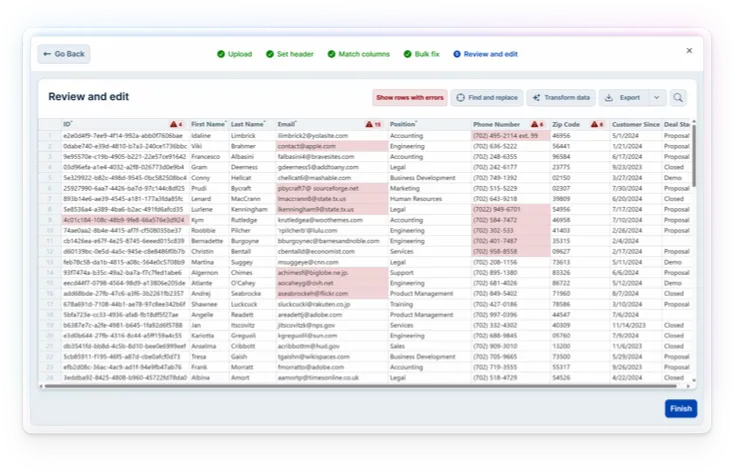
Enforce data types, regex patterns, required fields, uniqueness constraints, and custom rules. Errors highlighted inline for instant correction.
Deploy securely
Zero-Retention Architecture: Your Data Never Touches Our Servers
Don't share your data files with unnecessary third parties, including us!
-
Private mode
Keep files private. When embedded in your site and run in Private Mode, Dromo operates entirely in the web browser.
-
Bring your own storage
Skip the middleman. You can write files directly from the browser to your cloud storage without exposing them to an intermediary.
-
Self-hosted options
Stay in complete control. You can deploy Dromo via Kubernetes and host it in your cloud infrastructure.
Secure Imports, Trusted Processes
SOC 2, HIPAA, and GDPR Compliant Out of the Box
Dromo undergoes rigorous controls and audits to ensure our products and processes are secure end-to-end. You can rest assured that your imports are safe in our hands.
-
SOC 2 Type II Certified
Dromo adheres to the highest standards of security and availability as attested by our SOC 2 Type II certification.
-
HIPAA Compliant
As a HIPAA compliant entity, Dromo meets stringent standards to protect sensitive patient health information. We can enter a standard Business Associate Agreement (BAA), making using Dromo with PHI easy.
-
GDPR Ready
With Dromo's privacy-first architecture, GDPR compliance is a breeze. You can add Dromo to your app without worrying about data custody implications or subprocessor issues.
Learn more about Dromo's compliance and certifications in our Trust Center.
Move fast with Dromo
Connects to Your Existing Stack
Dromo integrates seamlessly with services across your existing stack, from Google Drive and Microsoft OneDrive to Slack and Hubspot, and hundreds of others.
Fix files from customers, collaborators and more
Compare Dromo with other providers- Reduce onboarding errors by 98%
- Save more than a year of engineering time
- Migrate in less than an hour
Easy ways to learn more about Dromo
FAQ
Frequently Asked Questions About Data Importing
- The Dromo importer walks a user through the process of validating, cleaning, and transforming a data file, guaranteeing that the final output meets all your quality standards and is in the form you expect.To configure Dromo, you simply define what the final data file should look like, along with any validation rules or constraints. You do this by creating a "schema" for each import, either in code (Dromo Pro only) or using the no-code Schema Studio.To use Dromo, you or an end user must:
- Initiate an import. This happens in one of two ways:
- A user opens the embedded Dromo importer and uploads a file (or manually enters their data)
- You send a file to the Headless API (this feature is a premium add-on)
- Match columns. After uploading a file, the user matches their column names to the names you require (where possible, the importer does this automatically on their behalf or uses AI to recommend matches).
- Run bulk transformations. The user may perform bulk transformations on the data, with suggestions powered by AI.
- Clean remaining errors. The user may review the final data in a familiar workbook interface, which highlights and annotates any errors. They can quickly isolate and diagnose problems and correct the data.
- If a user prefers to fix errors offline, they may download the current state of the import as an Excel workbook, complete with error annotations, from the review screen. Whenever they re-upload that file, the importer will pick up where they left off.
Dromo outputs the final cleaned data as a JSON object. You can now move the file to the next stage of your data pipeline (e.g., upsert it into a database, attach it to an email, save it in cloud storage) with confidence.Dromo also provides access to metadata about the import and has an option to view final data as a CSV file. - Initiate an import. This happens in one of two ways:
- Dromo's pricing is flexible, accessible, and honest. We list starting prices on our Pricing page, and we do not have hidden fees or surprise upcharges (such as for monthly billing or white labeling). You can get started without talking to sales or making any upfront commitment.We encourage new customers to experiment on the Free plan, then graduate to a usage-based plan that bills monthly (you can cancel anytime). Once you're confident in Dromo, we recommend an unlimited plan at a flat annual rate, so you don't have to manage variable costs as you scale or your usage fluctuates.
- Yes, you may launch an import programmatically using the Headless API (this feature is a premium add-on). If there are any errors during the import process (for example, a column cannot be matched automatically or a data validation fails) you are provided a URL where you can direct your user to fix the issues. If there are no errors, the import succeeds automatically and the user does not need to be involved.
- In many cases, no! Although we are SOC 2 certified and can securely process and store data, Dromo believes the very best way to protect your end user data is to never have access to it in the first place. To that end, we offer numerous private configurations that allow you to operate Dromo without the contents of your data files ever transiting our servers or networks.You can also deploy Dromo yourself via Kubernetes and host it in your own cloud.
- Yes, you can pass the final results of an import to services like Google Drive, Microsoft OneDrive, Dropbox, Slack, and hundreds of other out-of-the-box integrations via Zapier.You can also write your own server-side integrations using webhooks and the Dromo API.
- Yes, all Dromo plans are white label out of the box. You may customize the importer to match your brand and style guide by following these instructions.
- An embeddable CSV importer is a drop-in component that adds CSV, Excel, and TSV file upload capability to your web application. Instead of building import logic from scratch — parsing files, mapping columns, validating data, handling errors — you embed a pre-built importer that handles all of it. Your users get a polished import experience, and your engineering team saves months of development time. Dromo is an embeddable CSV importer used by SaaS teams to ship production-ready data import in minutes. It supports React, Angular, Vue, Next.js, and vanilla JavaScript.
- Dromo and Flatfile both offer embeddable data import, but they differ in several important ways. Dromo offers a zero-retention privacy architecture where imported data never touches Dromo's servers — the entire import runs in the browser or writes directly to your own cloud storage. Dromo is SOC 2 Type II certified and HIPAA compliant, and offers a self-hosted deployment option via Kubernetes for teams with strict data residency requirements. Dromo's pricing is transparent with no hidden fees for white labeling or monthly billing. Dromo also offers a Headless API with SFTP support for fully automated import pipelines, and AI-powered column mapping and data cleanup.
- Yes. Dromo is built for production-scale data imports. The Headless API is optimized for high-volume files and supports SFTP for large file transfers without browser limitations. For browser-based imports, Dromo uses streaming and chunked parsing to handle files that would crash a typical spreadsheet application. If you need to process millions of rows on a recurring basis, the Headless API with your own cloud storage (S3, GCS, Azure Blob) is the recommended approach.
- Yes. Dromo Embedded works with any JavaScript framework including React, Angular, Vue, Next.js, Svelte, and vanilla JavaScript. Integration typically takes less than 30 minutes. You install the Dromo package, define your schema (the columns and validation rules you expect), and render the importer component. Dromo handles everything else — file parsing, column mapping, data validation, error correction, and output. Quickstart guides are available in the Dromo documentation for each framework.
Ready to Ship a Better Data Import Experience?
AI-powered mapping. Real-time validation. SOC 2 certified. Deploys in minutes.